
Mini Gimbal for Instagram Reels: 8 Shots, Settings and Setup
Eight easy gimbal shots for Instagram Reels, the phone settings to use for vertical video, and how to set up a portable smartphone gimbal in under a minute.
Instagram Reels reward clips that feel smooth and deliberate. A tilted, trembling frame makes viewers scroll past in the first second. A mini gimbal for Instagram Reels fixes the two most common problems, the leaning horizon and small hand shake, and it is small enough to keep in your bag every day. The same gimbal for reels also works for YouTube vlogs and travel videos. This guide covers the phone settings to use, eight easy gimbal shots for reels, and how to set up a portable smartphone gimbal in under a minute.
Why a mini gimbal helps reels
Most reels are shot handheld, often while walking or turning. That is exactly when a phone tilts and shakes. A motorised gimbal keeps the phone level, so your walk-and-talk clips, outfit videos and product shots look planned instead of rushed. A mini gimbal also makes it easier to repeat the same movement for several takes, which helps when you edit clips to a beat.
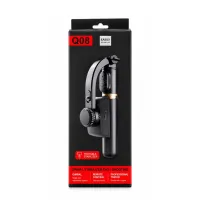
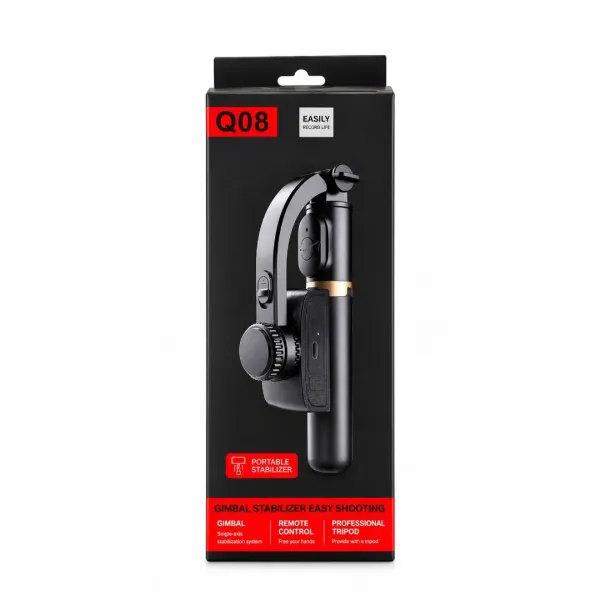
The Q08 mini gimbal for Instagram Reels is a 1-axis gimbal with a clamp that turns for vertical video, a built-in table tripod and a Bluetooth remote. It folds to about 19 cm and weighs about 250 g, so it fits in a handbag or backpack.
Phone settings for gimbal reels
- Shoot vertical video (9:16). Turn the gimbal clamp to portrait before you switch the gimbal on.
- Use 1080p or 4K. 1080p is enough for reels and saves storage. Use 4K only if you plan to crop.
- 30 fps for talking, 60 fps for movement. 60 fps gives smoother motion and lets you slow clips down slightly.
- Keep video stabilisation on. Your phone's stabilisation and the gimbal work well together.
- Lock focus and exposure. Tap and hold on your subject so brightness doesn't jump while you move.
- Clean the lens. A smudge spoils a smooth shot more than a little shake does.
8 easy gimbal shots for reels
- Walk-and-talk. Hold the gimbal at chest height, close to your body, and talk while walking slowly towards the camera. The best everyday vlog shot.
- Slow push-in. Move the phone slowly towards a product, dish or outfit detail. It works well for reveals.
- Pull-back reveal. Start close on a detail, then walk backwards to show the whole scene, such as a room, a shop or a view.
- Follow shot. Walk behind a friend, pet or child at the same pace. The gimbal keeps the frame level as you move.
- Side-tracking shot. Walk sideways, parallel to your subject. Good for streets, markets and store shelves.
- Low-angle walk. Hold the gimbal near the ground and walk forward for a dramatic feet-and-path shot.
- Selfie-stick wide shot. Extend the stick to about 70–75 cm to fit a group or more background into a vertical frame.
- Tripod and remote shot. Open the legs on a table and press the remote for outfit changes, cooking clips and talking-head videos.
Setting up a portable smartphone gimbal
A portable smartphone gimbal should take less than a minute to get ready. With the Q08 portable gimbal:
- Charge the handle fully through its USB port before the shoot day.
- Unfold the phone clamp and fit your phone in the centre. Remove a thick case if the phone leans.
- Turn the clamp to portrait for reels.
- Press and hold the power button until the green light comes on.
- Pair the remote with your phone's Bluetooth if you want to take photos from a distance.
- Open Instagram or your normal camera app and start recording. No separate gimbal app is needed.
Reels shooting tips for smoother gimbal video
- Walk heel to toe with soft knees. A 1-axis gimbal doesn't remove the bounce of each step, so your walk matters.
- Move slower than feels natural. Slow movement looks cinematic and you can speed it up in the edit.
- Turn your whole body, not your wrist. Quick wrist turns jerk the frame.
- Shoot in good light. Daylight near a window or outdoors keeps clips sharp.
- Record a few extra seconds before and after each move, so you have room to cut on the beat.
Why portability matters for creators
The best gimbal is the one you actually carry. Large 3-axis gimbals often stay at home because they are heavy and take time to balance. A portable smartphone gimbal that folds to pocket size and weighs about 250 g works as a travel gimbal for phone and goes with you to cafés, markets, weddings and trips, which is where most reel-worthy moments happen. With about 2 hours of use per charge, it covers a typical day of short clips.
When a mini gimbal is not enough
If your reels are mostly running, sports, dance with fast spins or bike rides, a 1-axis gimbal will struggle. Those shots need a 3-axis gimbal or an action camera. For everything else, from vlogs and outfits to food, travel and product reels, a mini gimbal gives a clear improvement at a small price. You can watch the handheld vs gimbal comparison on the Q08 gimbal page.
Frequently asked questions
Can I record reels directly in the Instagram app with a gimbal?
Yes. The Q08 stabilises the phone with its own motor and sensor, so it works with any camera app, including Instagram. Many creators still record in the phone's camera app for better quality and then upload.
Does the gimbal hold the phone vertically for reels?
Yes. The clamp rotates, so you can shoot vertical 9:16 video for reels or horizontal video for YouTube.
Which frame rate is best for gimbal reels?
Use 30 fps for talking clips and 60 fps for walking and movement shots. 60 fps looks smoother and gives you room to slow the clip down slightly.
Is a mini gimbal good for dance reels?
It works for slow and medium moves where the phone follows the dancer. For fast spins and jumps, a 3-axis gimbal or a fixed tripod gives better results.
Products in this guide
More Articles
View all
How to Set Up a Mini Tripod for Mobile: Desk, Pole, Outdoor and Overhead Shots
Gorilla Tripod vs Normal Tripod vs Gimbal: Which One Should You Buy for Your Phone?
Best Gorilla Tripod for Mobile: What to Check Before You Buy (and Are Cheap Ones Any Good?)