
How to Capture Smoother Videos and Better Selfies with a Smartphone Stabilizer?
Capture clear, steady videos and beautiful selfies with a smartphone stabilizer. Learn how it improves video recording, reduces camera shake, and makes everyday photography easier.
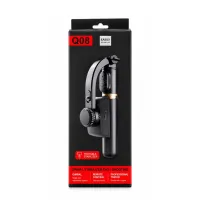
Making videos and recording special memories is now a common activity for people. Whether capturing travel memories and events involving family members, creating Instagram reels, or even YouTube videos, smartphone cameras have made videography possible for most people. Nonetheless, filming videos using a smartphone may lead to shakiness when holding the phone.
Using the phone stabilizer may be convenient when trying to keep a steady hand during the process of recording. It is especially handy for those individuals who like making videos on the move, while traveling, or even at home.
The mini gimbal is an accessory that will assist you in decreasing any unneeded movement of your phone while recording. Such functions as motorized stabilization, extending handle, integrated tripod, and wireless control may come in handy.
What Is a Mini Gimbal and How Does It Work?
A gimbal is a camera support device that uses a motorised mechanism to help maintain a stable camera position. Unlike a regular selfie stick, which simply extends the distance between the phone and the user, a gimbal also helps reduce unwanted movement during recording.
The device uses a motor to keep the smartphone level when the handle tilts or moves slightly. This can help reduce side-to-side shaking and tilted footage while recording videos.
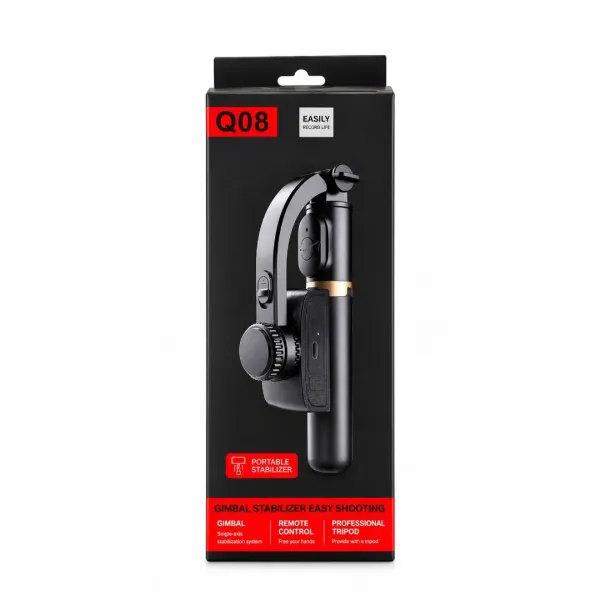
The Jikra Smartphone Stabiliser includes a one-axis powered design. Moreover, it integrates three functionalities into one gadget: a hand-held stabiliser, a telescopic selfie stick, and a folding table tripod.
This multi-functionality renders the device appropriate for daily content creation and photography/ videography.
Why Is a Mini Gimbal for Phone Useful?
Smartphones make recording convenient, but carrying them over long periods of time is cumbersome, hence making it hard to keep steady frames. A mini gimbal for phone will help keep steady frames and make things easier.
Here are some practical benefits.
1. Helps Reduce Camera Shaking
Even slight movements of one’s hands can make the recorded videos on one’s smartphone look unbalanced. A motorized stabilizer is helpful in reducing unnecessary movements such as tilting.
This is especially true for videos shot during walk and talk sessions or even during travels.
However, a single-axis stabilizer does not eliminate every type of movement. Walking bounce, fast turns and low-light motion blur may still affect recordings.
2. Makes Selfies and Group Photos Easier
However, taking photos in groups may pose some problems, especially since everyone should fit in one shot. The extendable arm will give some extra space between the phone and the subjects.
The included detachable Bluetooth controller will help you take photos without having to touch the smartphone. You can use it when taking pictures with your family or traveling with friends.
3. Supports Different Shooting Orientations
It is important to note that the various social media platforms and types of videos have different screen orientation requirements. Vertical videos are mostly common for reels, while horizontal orientation is appropriate for regular YouTube videos.
The adjustable phone holder supports both portrait and landscape positioning, giving users more flexibility when creating content.
4. Provides Hands-Free Recording
The built-in foldable tripod ensures that the device can remain steady on a flat surface, which is useful during video calling and online classes apart from other still image capturing processes.
The tripod feature also helps in taking pictures using your smartphone without holding the device always.
Key Features of the Jikra Smartphone Stabilizer
The Jikra stabilizer combines practical functions in a compact design for everyday smartphone photography and videography.
Single-Axis Motorised Stabilisation
The motor plays an important role in keeping the smartphone steady even when there are small movements in your hands.
It is a good choice if you intend to record your video while walking or casually. But if you are doing some running, sporting or making some cinematic motions, you may need a three-axis stabilizer.
Three-in-One Multifunctional Design
One of the useful features is its three-in-one construction.
- Handheld stabilizer: Hold the device while recording travel videos, walk-and-talk content and everyday clips.
- Extendable selfie stick: Extend the handle to approximately 70–75 cm for wider frames and group photographs.
- Foldable tripod: Open the tripod legs at the bottom to position your smartphone on a table or flat surface.
These functions make it useful for different photography and recording situations.
Detachable Bluetooth Remote
With the wireless remote, users have the freedom of taking pictures without even physically touching their mobile phones since it provides the capability of operating the shutter remotely from a distance of about 10 meters.
It is beneficial while taking selfies, group shots, and tripod recording videos.
Adjustable Smartphone Holder
The rotating holder for the cell phone is capable of taking both horizontal and vertical orientations. This holder can be used to hold smartphones whose widths fall within 60-95 mm, such as Android and iPhones.
This makes it appropriate for various formats and styles of recording videos.
Rechargeable Battery
This device has a built-in 450 mAh rechargeable battery that offers around two hours of operation per charge.
It can be recharged via the USB port in the handle. The separate remote controller requires a replacement coin-cell battery.
Compact and Lightweight Construction
Weighing approximately 250 grams, the device is convenient to carry during everyday travel. Its folded dimensions are approximately 19 × 7 × 6 cm, making it easy to store in a suitable bag.
Where Can You Use a Gimbal Stabilizer?
A gimbal stabilizer can be useful in several everyday situations where smartphone recording is involved.
- Travel vlogging: Record walking clips, sightseeing videos and memorable travel experiences.
- Social media content: Create vertical reels, short videos and lifestyle content.
- Family occasions: Capture celebrations, gatherings and group photographs.
- Product videos: Record product demonstrations and tabletop content.
- Online classes: Use the built-in tripod to position your smartphone during virtual learning sessions.
- Video calls: Keep your phone positioned comfortably without holding it throughout the conversation.
How to Use a Mobile Stabilizer Gimbal
Setting up the device is straightforward. Follow these basic steps before recording:
- Charge the handle through its USB charging port.
- Unfold the phone clamp and position your smartphone in the centre.
- Press and hold the power button until the green indicator light appears.
- Pair the detachable remote with your smartphone through Bluetooth.
- Open your phone's regular camera application and start recording.
- Keep the handle close to your body while walking to reduce unwanted movement.
- For stationary recording, open the tripod legs and position the device on a flat surface.
For better results, keep your phone's built-in video stabilisation enabled. Walk slowly and avoid sudden movements while recording.
How to Choose the Right Smartphone Stabilizer?
Before purchasing a stabilising accessory, consider a few important factors.
Stabilisation type: Understand whether you need a single-axis or three-axis stabilizer based on the type of videos you create.
Phone compatibility: Check the supported smartphone width to ensure your device fits properly.
Portability: A lightweight and foldable design is useful for travel and everyday recording.
Shooting modes: Look for adjustable phone positioning if you create both vertical and horizontal videos.
Remote control: A wireless shutter remote can make selfies and group photography more convenient.
Additional functionality: Features such as an extendable handle and built-in tripod can provide more flexibility than a basic selfie stick.
Buy a Mini Gimbal for Smartphone Photography from Jikra
In case you like making videos, selfies, and recording your travel experience, then this mini gimbal should not be overlooked.
Jikra is the combination of single axis motorised stabiliser, extending selfie stick, folding tripod, and wireless Bluetooth remote control. An adjustable holder of the device allows you to take portrait and landscape footage.
Explore the Jikra Mini Gimbal and Smartphone Stabilizer and make everyday photography and video recording more convenient.
Overall Summary
Making better videos using the smartphone doesn't necessarily have to use sophisticated cameras. With the correct accessories, it becomes easier to film, frame, and take pictures.
The multi-tasking compact stabiliser is very handy for individuals who love capturing photos while travelling, posting photos on social media sites, taking selfies and shooting videos with their smartphones. The Jikra product, with its motor stabilisation feature, extensible handle, folding tripod and wireless remote, is the answer to all your photography requirements.
Products in this guide
More Articles
View all
USB Type C to 3.5 mm Jack Adapter: The Smart Way to Use Wired Earphones
USB Type C to 3.5 mm Jack Adapter: Does It Work With Every Smartphone?
How a Ring Light with Stand Can Improve Your Video and Content Quality