USB Type C to 3.5 mm Jack Adapter: The Smart Way to Use Wired Earphones
Discover how a USB Type C to 3.5 mm Jack Adapter works with wired earphones, supports charging on compatible phones, and what to check before buying.
In this guide
Many smartphones today come with a USB-C charging port but no traditional headphone jack. While wireless earbuds are popular, many people still prefer wired earphones for listening to music, attending online classes, or watching videos.
A USB Type C to 3.5 mm Jack Adapter provides a convenient way to connect wired headphones to compatible smartphones. Some models also include an additional charging port, allowing users to listen and charge simultaneously.
However, choosing the right adapter requires understanding compatibility, audio support, and charging features.
Why Choose a USB Type C to 3.5 mm Jack Adapter?
Wired earphones remain useful because they do not require separate charging and can provide a reliable listening experience.
A suitable adapter allows users to continue using their existing headphones without purchasing another audio accessory.
This can be especially helpful for students, travellers, and people who frequently attend online meetings.
However, not every adapter supports every smartphone. Checking technical compatibility before purchasing is essential.
How Does a 2-in-1 Type-C Adapter Work?
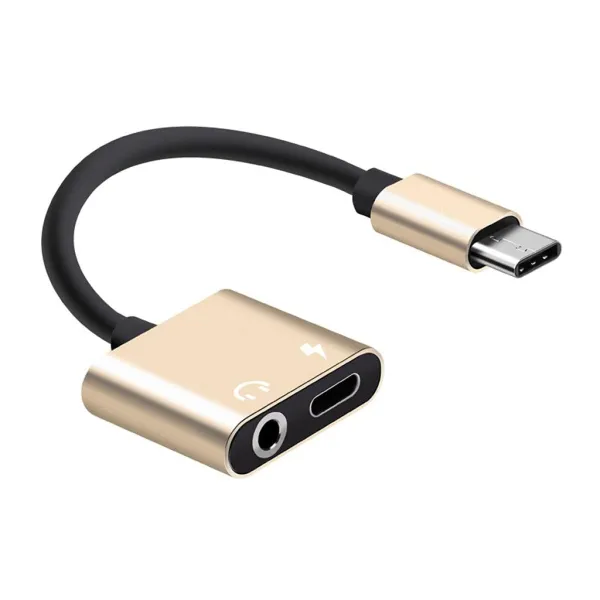
A 2-in-1 adapter connects to a smartphone through its USB-C socket and provides separate connections for headphones and charging.
The combination of a type c port and 3.5 mm headphone jack allows compatible devices to use wired audio while receiving power.
For example, you can connect earphones to the headphone socket and a charging cable to the USB-C charging connection.
This arrangement is practical during long calls, video streaming, or travel when battery levels are low.
However, charging speed and audio functionality depend on the smartphone and adapter specifications.
Understanding Smartphone Audio Compatibility
Although USB-C connectors look similar, their audio capabilities may differ.
Some smartphones require a digital-to-analog converter, commonly called a DAC, to deliver sound through traditional headphones.
A type c to 3.5 mm headphone jack adapter must support the audio technology required by the connected smartphone.
Before buying, check your phone manufacturer's instructions and the adapter's compatibility details.
Also confirm whether microphone support is available if you intend to use wired earphones for calls.
Benefits of Using Wired Earphones With an Adapter
1. Continue Using Existing Headphones
A type c to headphone jack converter can help extend the usefulness of wired headphones you already own.
Instead of replacing your earphones, you may only need a compatible connector.
2. Convenient Everyday Listening
A compact type c headphone adapter is easy to carry in a bag or pocket.
It can be useful during commuting, studying, entertainment, and everyday smartphone use.
3. Charging and Audio Together
With a compatible 2-in-1 model, users do not need to disconnect their headphones every time their smartphone requires charging.
This is particularly convenient during longer listening sessions.
4. Simple Connection
Most compatible adapters require no complicated setup. Connect the adapter, insert your headphones, and check whether the phone detects the audio accessory.
What to Check Before Buying an Audio Adapter
Choosing the right accessory is more important than selecting the cheapest option.
Before you buy audio jack adapter accessories, consider these factors:
- Phone compatibility: Confirm that the adapter supports your exact smartphone model.
- DAC requirements: Determine whether your phone needs digital audio conversion.
- Charging support: Check the supported charging specifications.
- Microphone compatibility: Verify support for wired headset calls.
- Build quality: Look for secure connectors and a flexible cable.
- Return policy: Review replacement options in case of compatibility problems.
Some shoppers search for best buy audio jack adapter options when comparing products. However, ratings and prices alone cannot confirm whether an accessory will work with a particular phone.
Similarly, a listing described as headphone adapter type c should clearly explain its connections and supported functions.
What If Your Type-C Adapter Is Not Working?
If you encounter a type c to headphone jack not working problem, start with a few basic checks.
First, disconnect and reconnect the adapter. Ensure the USB-C connector is fully inserted and the phone case is not blocking it.
Next, test your earphones with another compatible device and check the phone's audio output settings.
If the problem continues, the adapter may not support your smartphone's audio technology.
Avoid forcing connectors or assuming that all adapters are universally compatible.
JIKRA 2-in-1 Type-C Audio and Charging Adapter
JIKRA offers a compact gold-coloured adapter with a short black cable and two clearly marked connections.
The 3.5 mm socket is designed for wired headphones, while the additional USB-C port is intended for charging.
Its compact design makes it convenient for everyday use and travel.
The product listing does not confirm a built-in DAC, specific fast-charging wattage, or universal microphone compatibility. Buyers should verify these requirements before ordering.
Explore the JIKRA 2-in-1 Type-C Connector for product specifications and purchasing information.
Conclusion
A USB Type C to 3.5 mm Jack Adapter can be a practical accessory for people who prefer wired earphones.
A suitable 2-in-1 model may also provide the convenience of listening while charging.
The most important step is checking smartphone compatibility, audio requirements, and charging support before making a purchase.
Frequently Asked Questions
1. Can I charge my phone and use wired earphones simultaneously?
Yes, compatible 2-in-1 adapters allow charging and wired audio together. Both functions must be supported by the smartphone and adapter.
2. Do Type-C headphone adapters work with every smartphone?
No. Some phones require a built-in DAC, while others have different USB-C audio requirements.
3. Does a 2-in-1 Type-C adapter support fast charging?
Some adapters support fast charging, but not all. Check the supported wattage and compatibility before purchasing.
4. Can I use a Type-C adapter for phone calls?
Some adapters support headset microphones, while others provide audio output only. Confirm microphone compatibility before buying.
5. How do I connect wired earphones to a phone without a headphone jack?
Connect a compatible adapter to the phone's USB-C port, then insert your wired earphones into its 3.5 mm socket.