
Create Better Smartphone Content: A Guide to Choosing the Right Mobile Filming Accessory
Create better smartphone content with the right mobile filming accessory. Explore useful features, stability, portability and tips for capturing smoother videos and better-quality photos.
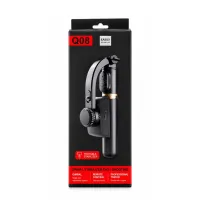
It is common for people to film videos using their smartphones. This includes filming content for Instagram reels, capturing travel moments, posting product reviews, participating in video conference calls and recording special events. Despite all the advanced features in today’s smartphones, taking the perfect shot isn’t always simple.
Some of the difficulties include holding the phone while recording. This might cause discomfort after some time, switching of angles might require some effort, and recording yourself might not be an easy task. An important filming accessory might help with this.
A mini gimbal combines smartphone support with features such as an extendable selfie stick, a foldable tripod and motorised stabilisation. It offers a practical way to manage different recording situations without carrying several separate accessories.
Why Smartphone Filming Needs More Than a Good Camera
The camera on a smartphone is capable of producing high-quality images. However, your positioning of the smartphone can also determine how good an image will turn out to be, especially when taking shots while walking or switching angles.
There are several situations where additional phone support can be useful:
- Recording yourself while travelling or exploring a new place.
- Capturing videos for Instagram, YouTube and other social platforms.
- Taking group photographs without asking someone else for help.
- Recording product demonstrations for an online store.
- Attending video calls while keeping your phone in a comfortable position.
A mini gimbal for phone recording provides a convenient combination of support and flexibility. Instead of holding your smartphone directly, you can use the handle to maintain a more comfortable grip and adjust the camera position according to your needs.
What Makes a Multifunctional Phone Stabiliser Useful?
An excellent smartphone attachment should be easy to carry around as well as to use. The Jikra stabilizer incorporates three operations that may be useful in various content creation processes.
Handheld recording for everyday videos
Using your phone to record vlogs or capture video while moving around can cause unintentional shakiness and tilt while using it.
The motorized one axis will assist in keeping the phone leveled and prevent some motions. It can come in handy when recording casual videos, travel videos, and walk-and-talk videos.
For smoother results, maintain a steady grip and avoid sudden movements while recording.
Selfie stick functionality for better framing
A correct spacing of the camera from the subject may make all the difference to the photos that you will take. It is extended to about 70–75 centimeters, which allows you to shoot wide shots.
This is especially helpful in taking group self-shots and travel pictures, where the surroundings also need to be included in the photo.
You can also adjust the phone holder between portrait and landscape positions depending on the type of content you want to create.
Tripod support for hands-free activities
Other times, you may require your phone to stay put while you do something else. The adjustable tripod legs ensure that the handle stands firm on a level surface.
This device can be used for online classes, video calls, product photos, tutorial videos, and group shots. This device helps record videos without anyone holding the camera for you.
Important Features to Consider Before Buying
Before choosing a gimbal stabilizer, it is worth understanding the features that make a particular device suitable for your recording requirements.
Here are some practical features available in the Jikra smartphone stabiliser:
One-axis motorised stabilisation: This motor makes the phone stay level and reduces any shaking movements of the camera. It is fit for recording videos, but it is not capable of doing all of what a three-axis gimbal can do.
Wireless Bluetooth remote: The removable remote enables you to control the camera on your phone from a distance of about 10 meters. This is useful when taking pictures in groups or shooting videos in tripod mode.
Adjustable phone holder: The clamp supports compatible smartphones with widths of approximately 60–95 mm. It also allows portrait and landscape positioning.
Compact and portable design: The device has dimensions of about 19 cm when folded and has a weight of approximately 250 g. The compact design enables ease in carrying during travels.
Rechargeable battery: The handle has an integrated 450 mAh rechargeable battery that gives two hours of usage time per each charge cycle. It is recharged via USB cable connection.
Simple camera operation: Your smartphone camera application can be used to record the video without having to download a different filming application.
One-Axis vs Three-Axis Stabilisation: Know the Difference
Not all smartphone stabilizers serve the same function. By having knowledge of the differences between one-axis and three-axis stabilizers, you will be able to purchase an appropriate gadget.
One-axis stabilizer is concerned with ensuring that the device remains horizontal by minimizing the movement along a specific axis. This can assist in making video capturing easy especially in cases of slight tilting of the device.
A three-axis stabilizer provides a broader range of motion corrections on three axes. It becomes more suitable for people who take many action videos, quick motions, or movie-like clips.
The Jikra product is characterized by a single-axis motorized design. It is not capable of eliminating bouncing while moving vertically, quick motions, or motion blurring in low light. So, it is better for casual phone recordings than for professional filming.
How to Prepare Your Phone for Recording
Getting started with a smartphone stabiliser does not require advanced technical knowledge. Follow these steps to prepare the device:
- Charge the handle: It is imperative to connect your gadget to the USB power supply prior to using it.
- Fit your smartphone: Unfold the adjustable clamps to insert your phone inside in the middle.
- Activate the stabilizer: Press the power button for the green light to appear.
- Pair the remote: Link the detachable Bluetooth remote to your smartphone.
- Set the camera position: Choose either portrait or landscape according to the need for shooting.
- Launch the camera application: Use the ordinary camera application installed in your smartphone to shoot videos/photos.
- Set the tripod: Unfold the foldable legs and place your device at a flat surface.
Make sure that the phone is safely placed prior to turning on the phone. It is advisable not to use any excessively heavy case for your phone or any extra accessories.
Who Should Consider Using a Smartphone Stabiliser?
A multifunctional phone accessory can be useful for different users, depending on how frequently they record content.
- Beginners: Beginners in making videos on their smartphones could enjoy the added benefits of having a separate handle as well as adjustable phone holder.
- Travel lovers: Its extendable features and compact nature make it great for taking photos and documenting trips.
- Social media creators: This could help them in making their day-to-day reels and other video-related posts.
- Online sellers: Small-scale business owners can use the tripod setup for product demonstrations.
- Students and professionals: Hands-free phone holder is great during online lectures or meetings.
- Families: The remote shutter makes it easier to take group photographs without leaving anyone out.
Make Smartphone Recording More Convenient with Jikra
Creating smartphone videos can become easier when you have an accessory that supports different recording styles. From handheld filming and selfies to tripod-based recordings, a multifunctional device can reduce the need to carry separate equipment.
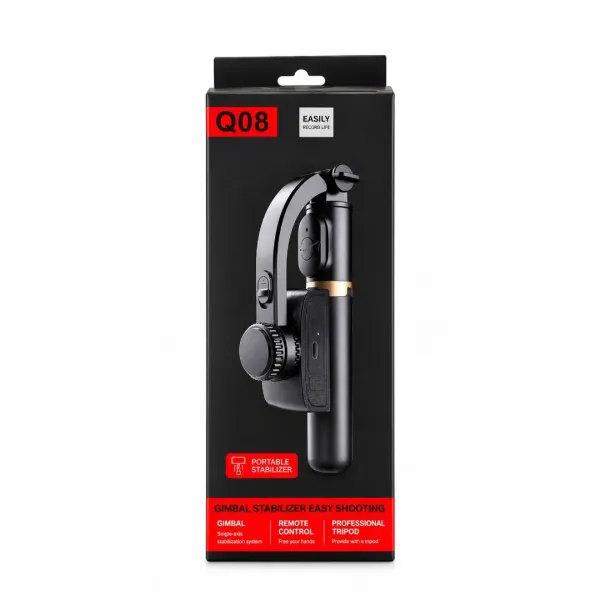
The Jikra one-axis mini gimbal combines motorized phone holder, extendable selfie stick, folding tripods legs and Bluetooth remote control. This works perfectly well on both Android phones and iPhones whose width varies between 60 and 95 mm.
Should you need an appropriate accessory for capturing video on a daily basis, it would be worthwhile to consider the Jikra smartphone stabilizer and find out how it can assist in shooting videos with your smartphone.
Products in this guide
More Articles
View all
USB Type C to 3.5 mm Jack Adapter: The Smart Way to Use Wired Earphones
USB Type C to 3.5 mm Jack Adapter: Does It Work With Every Smartphone?
How a Ring Light with Stand Can Improve Your Video and Content Quality