
1-Axis vs 3-Axis Gimbal: Which Is Right for Android and iPhone?
What each gimbal axis corrects, when a 1-axis gimbal is enough, when you need 3-axis, and what to check when buying a gimbal stabilizer for Android and iPhone.
When you shop for a phone gimbal, the first choice is how many axes it has. A 1-axis gimbal is small and affordable. A 3-axis gimbal is smoother and costs several times more. This guide explains what each axis does, which type suits the videos you make, and what to check when you buy a gimbal stabilizer for Android and iPhone.
What an "axis" means on a gimbal
A phone can move in three ways while you hold it. Each way is called an axis, and a gimbal needs one motor for every axis it corrects.
- Roll: the picture leaning left or right, like a tilted horizon.
- Tilt: the phone nodding up and down.
- Pan: the phone swinging left and right.
Roll is the movement viewers notice first, because a crooked horizon makes any clip look careless. That is why even a single motor makes a visible difference.
How a 1-axis gimbal works
A 1-axis gimbal, also called a single-axis gimbal, has one motor that corrects roll. It keeps the picture level as you walk, turn and switch hands, and it calms small hand shake. It can't correct nodding or swinging, so the bounce of walking and fast turns still show.
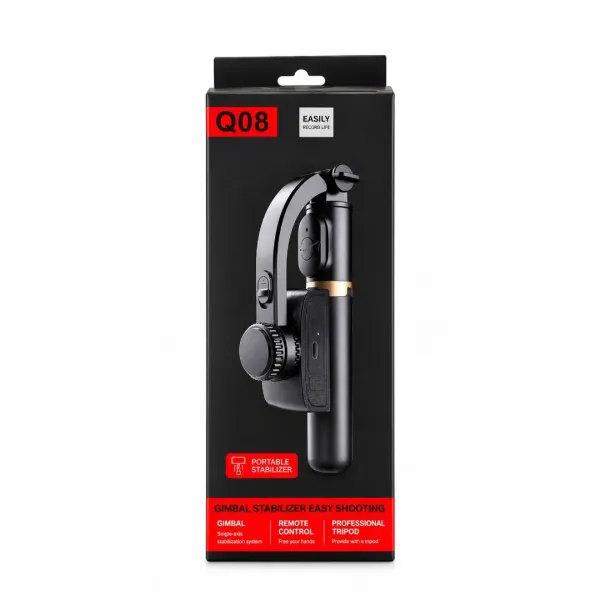
The Q08 1-axis gimbal is a good example. It also packs an extendable selfie stick and table tripod legs into the handle, folds to about 19 cm and weighs about 250 g.
How a 3-axis gimbal works
A 3-axis gimbal for mobile has three motors, one each for roll, tilt and pan. It holds the phone steady in every direction, which gives the smooth, floating look you see in travel films and real-estate tours. Many 3-axis models also use an app for tracking and special modes.
The trade-offs are size, weight, price and setup. A 3-axis gimbal is bulkier, needs balancing each time you mount the phone, and costs several times more than a 1-axis model.
1-axis vs 3-axis at a glance
- Corrects: 1-axis fixes roll only. 3-axis fixes roll, tilt and pan.
- Smoothness: 1-axis gives level, calmer footage. 3-axis gives near-cinematic footage.
- Walking bounce: 1-axis does not remove it. 3-axis reduces it, but your walk still matters.
- Size and weight: 1-axis models are pocket-sized. 3-axis models are larger and heavier.
- Setup: 1-axis is clamp and switch on. 3-axis usually needs balancing.
- App: 1-axis models like the Q08 need no app. 3-axis models often use one for extra features.
- Price: 1-axis is budget. 3-axis costs several times more.
Which one should you buy?
Choose 1-axis if you make vlogs, reels, travel clips, family videos or product videos and your main problem is tilted or slightly wobbly footage. You also want something light you'll actually carry.
Choose 3-axis if you shoot running, sports, cinematic pans or paid work where every bump matters, and you don't mind the extra weight, setup time and cost.
For most beginners a 1-axis mobile gimbal is the sensible first step. It fixes the most visible problem and shows you whether a gimbal fits the way you film.
Choosing a gimbal stabilizer for Android and iPhone
Most phone gimbals work with both Android and iPhone. Whether you need a gimbal for iPhone or a gimbal for Android, check these points before you buy:
- Clamp width. Measure your phone. The Q08 clamp takes phones 60–95 mm wide, which covers most Android phones and iPhones, including large ones.
- Weight and case. Heavy phones, thick cases and ring grips can make a small gimbal lean. Remove the case if the phone tilts to one side.
- Camera position. Phones with large camera bumps can sit off-centre. Clamp the phone in the middle before you switch on.
- Remote pairing. A Bluetooth shutter remote should pair with both Android and iOS like any other accessory.
- App dependence. If a gimbal only works fully through its own app, check the app supports your phone. A gimbal that stabilises in hardware works with any camera app.
The Q08 gimbal stabilizer for Android and iPhone stabilises inside the handle, so it works the same on both platforms with the phone's own camera app. There is no gimbal app to install or update.
Getting the best from either type
- Keep your phone's own video stabilisation on.
- Hold the gimbal close to your body.
- Walk heel to toe with soft knees.
- Turn slowly so the motors can follow.
- Shoot in good light to avoid blur.
At the time of writing the Q08 costs ₹1,399 with free delivery and 7-day returns. Watch the handheld vs gimbal test on the Q08 product page.
Frequently asked questions
What is the difference between 1-axis and 3-axis gimbals?
A 1-axis gimbal has one motor that keeps the picture level by correcting roll, the left-right lean. A 3-axis gimbal has three motors that also correct tilt (nodding up and down) and pan (swinging side to side). 3-axis gimbals give smoother video but are larger, heavier, need balancing and cost several times more. 1-axis gimbals are small, quick to set up and affordable.
Can I use a gimbal without an app?
Yes, with many gimbals. The Q08 has its motor and sensor inside the handle, so it stabilises the phone on its own and you record in your normal camera app. Some 3-axis gimbals work without an app for basic stabilisation but need their app for tracking and special modes.
Is a 1-axis gimbal enough for YouTube vlogs?
For walk-and-talk vlogs at a steady pace, travel clips and product videos, yes. It keeps the frame level and calms hand shake. For running or fast action, a 3-axis gimbal is the better choice.
Will a gimbal fit a large phone like a Pro Max or Ultra model?
Check the clamp width. The Q08 fits phones 60–95 mm wide, which covers most large phones. Take off a heavy case if the phone leans after mounting.
Products in this guide
More Articles
View all
How to Set Up a Mini Tripod for Mobile: Desk, Pole, Outdoor and Overhead Shots
Gorilla Tripod vs Normal Tripod vs Gimbal: Which One Should You Buy for Your Phone?

Best Gorilla Tripod for Mobile: What to Check Before You Buy (and Are Cheap Ones Any Good?)