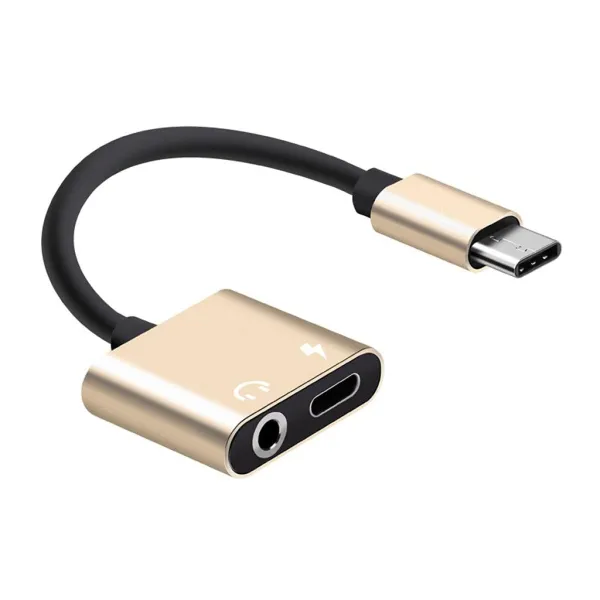
Type-C Headphone Jack Adapter with Charging Port: How to Choose and Use One
How a 2 in 1 Type-C headphone jack adapter lets you use wired headphones and charge your phone at the same time, what to check before you buy, and how to look after it.
In this guide
Many new phones no longer have a 3.5 mm headphone jack, only a single Type-C port. That means you cannot use wired headphones and charge the phone at the same time. A 2 in 1 Type-C headphone jack adapter solves this by turning that one port into two: a 3.5 mm audio jack and a Type-C charging port.
What a 2 in 1 Type-C Adapter Does
The adapter plugs into your phone's Type-C port. At the other end is a small head with two ports:
- 3.5 mm audio jack for wired headphones, earphones or an AUX cable to a speaker or car stereo.
- Type-C charging port for your charger cable.
With both plugged in, you can keep listening, take calls or play games while the phone charges.
Check That Your Phone Supports It
Type-C audio support differs between phone models. Before you buy, check that your phone works with Type-C headphone adapters; the phone's manual or the maker's website will say. The adapter needs a phone with a Type-C port, and it will not fit phones with a Lightning or micro-USB port.
Charging Through the Adapter
The charging port lets you top up the phone while you listen. Whether your phone fast-charges through an adapter depends on the phone, the charger and the adapter, so if charging speed matters to you, compare it once with the charger plugged straight into the phone.
What to Look For
Clearly Marked Ports
Small headphone and charging icons on the head show which port is which, so you plug the right cable in first time, even in a dark car or a crowded bus.
A Cable Between Plug and Head
A length of cable between the Type-C plug and the dual-port head takes strain off your phone's port. The phone can sit in your hand or pocket without the charger cable levering on the plug.
A Plug That Fits Your Case
Thick phone cases can stop a plug from going fully into the port. If audio cuts in and out, check that the Type-C plug is pushed all the way in.
How to Use It
- Plug the adapter's Type-C plug into your phone.
- Plug your wired headphones or AUX cable into the 3.5 mm jack.
- Plug your charger cable into the Type-C charging port if you want to charge at the same time.
Looking After the Adapter
- Pull it out by the plug, not the cable.
- Do not wrap the cable tightly or bend it sharply where it meets the plug.
- Keep the ports clean and dry, and store it in a pocket or pouch so the plug does not get bent.
Who It Suits
- Commuters who use wired earphones and need to charge on the way.
- Gamers who prefer wired headphones during long sessions.
- Drivers who play music through a car stereo's AUX input while charging.
- Anyone on long video calls who wants wired audio and a charging phone.
JIKRA Type C Headphone Jack Adapter at a Glance
| Type | Type-C to 3.5 mm headphone jack adapter with charging port |
| Ports | Type-C plug; 3.5 mm audio jack and Type-C charging port on the head |
| Use | Listen and charge at the same time |
| Port labels | Headphone and charging icons |
| Finish | Gold-coloured plug and head with a black cable |
| Compatible with | Phones with a Type-C port that support Type-C headphone adapters |
See the JIKRA Type C Headphone Jack Adapter for the current price and delivery details.